
Schrift system uses so-called Freemium approach, a combination of free and paid tariffs. This makes it possible to offer extremely wide range of work possibilities.
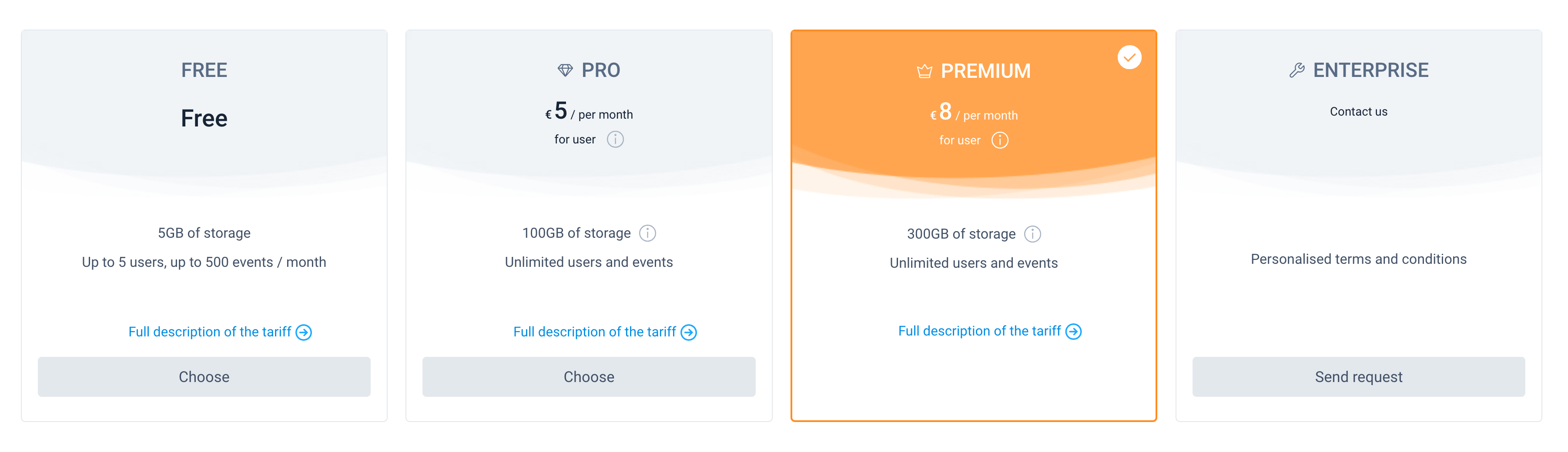
For paid tariffs, the amount of payment is calculated based on the selected tariff plan, based on the number of employees authorized in the system who had appointments during the previous payment period.
Tariff Free
When you create a new company, the Free tariff plan is automatically applied to it.
This free tariff provides 5GB of storage per company, up to 5 users, up to 500 events per month, almost full system functionality for the company's full-fledged work with documents, and basic support. Thus, given that the monthly event limit is reset to zero, this allows small companies to use the Schrift system for free for an unlimited period of time.
Regardless of whether your counterparty uses Schrift system (communicates with you in Schrift Intercompany) or not (communicates in the guest interface), the number of your counterparties (contacts) on any tariff is not limited.
The user can have no more than 5 companies at the same time on a free plan, with the role of Owner in these companies.
Paid tariffs: Pro and Premium
Switching to a paid plan is done by simply selecting a plan in the Plan section of the Company Account section, filling in the necessary details for the invoices to be issued, and confirming the action.
Schrift system will send a notification email about the tariff change to the emails of employees with the Owner role. The features of the selected plan become available immediately. Payment can be made by bank transfer within 5 days or by payment card (for payments in euros).
In addition to the basic features of the system, the Pro and Premium plans offer an unlimited number of employees, an unlimited number of events, and 100 GBt / 300 GBt of storage (respectively) per company. The availability of the system's functions in the corresponding tariff is described on the website.
If the storage capacity exceeds 100 GB, the system will dynamically expand it, and a surcharge will be added to the monthly bill for each additional 50 GB of storage.
Managing payment notifications
If the payment deadline has passed (for example, due to a delay in the bank transfer or if the payment was simply forgotten), an information banner may appear in the system for all employees.
To avoid causing unnecessary concern among the team, a user with the role of Owner or Administrator of the company can independently enter payment information in the settings. This allows you to instantly hide the debt banner for all users of the organisation and ensures the continuous and comfortable work of the team while the financial issue is being resolved at the management level.
Tip: You can use this option even if the payment has not actually been completed yet, but you plan to do so in the near future.
Tariff Enterprise
The Enterprise plan includes all the features of the Premium plan and the ability to install the system on the client's server. The cost of the Enterprise plan is agreed with the client individually.